
A website traffic loss audit helps you find the issue behind a traffic drop. Your traffic dropped, and you need the reason. This SEO guide shows each step.
What Is a Website Traffic Loss Audit?
A website traffic loss audit is a structured investigation. It tells you what happened and when. Each web problem rarely has one cause. A simple diagnosis gives context, so you understand the loss before you fix anything. We investigate websites the same way every time.
Warning Signs You Need a Traffic Loss Audit
Watch for early warning signs. Weaker rankings are one sign. Sites often lose traffic quietly. If you’ve seen fewer orders, spot the pattern now. If you’re unsure, pay attention to the weekly numbers. They aren’t random.
Sudden vs. Gradual Traffic Drops
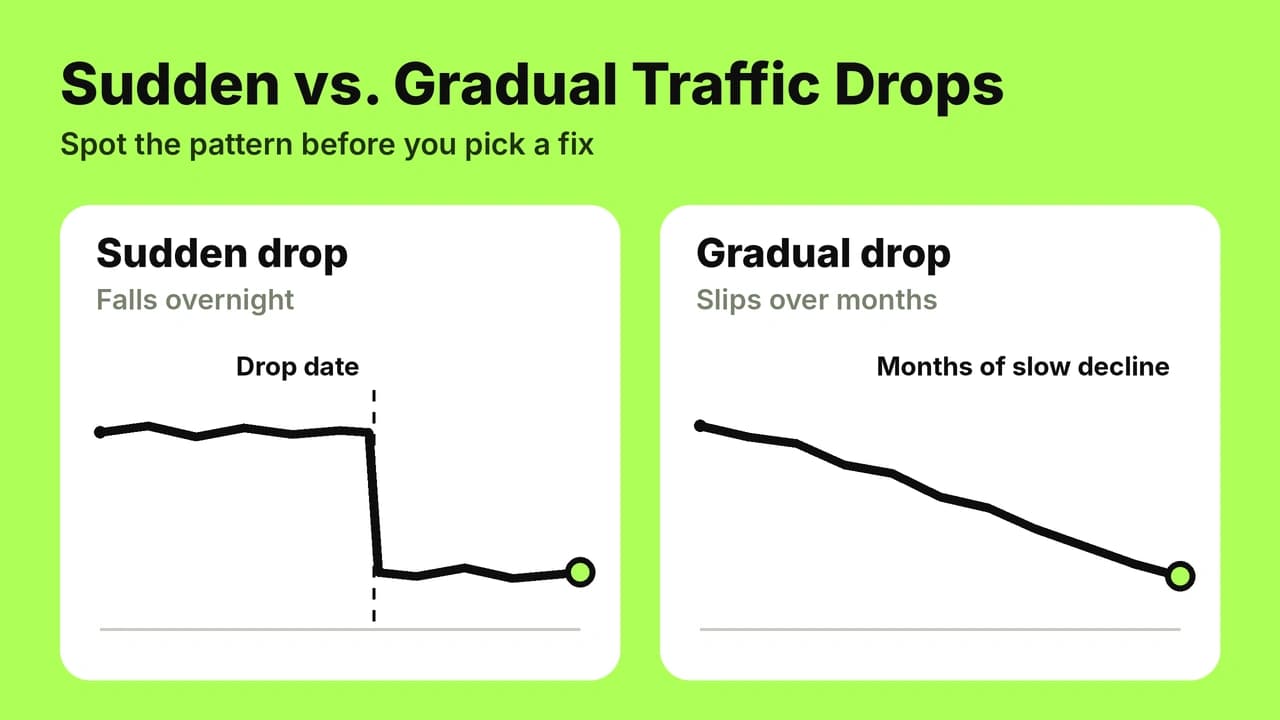
Sudden drops hit overnight. A gradual decrease looks like slipping trend lines. Traffic fell at these points, so mark them. A small dip may be noise. Decreasing trends over months signal a deeper fall. Note which pages were affected.
Small or Flat Traffic Declines: Are They Worth Auditing?
A small decline can matter. Traffic that stayed steady looks good, yet a stalled site isn’t growing. Stable totals can hide a smaller segment that declined. Even if totals hold, a check is worth it. You aren’t overreacting when numbers held flat for months.
What Lost Traffic Costs Your Business
Lost traffic costs money. Fewer visits lead to fewer leads. A lower conversion rate cuts revenue. Businesses see losses in conversions first. Think of it as a leak in your sales path.
Common Causes of Website Traffic Loss
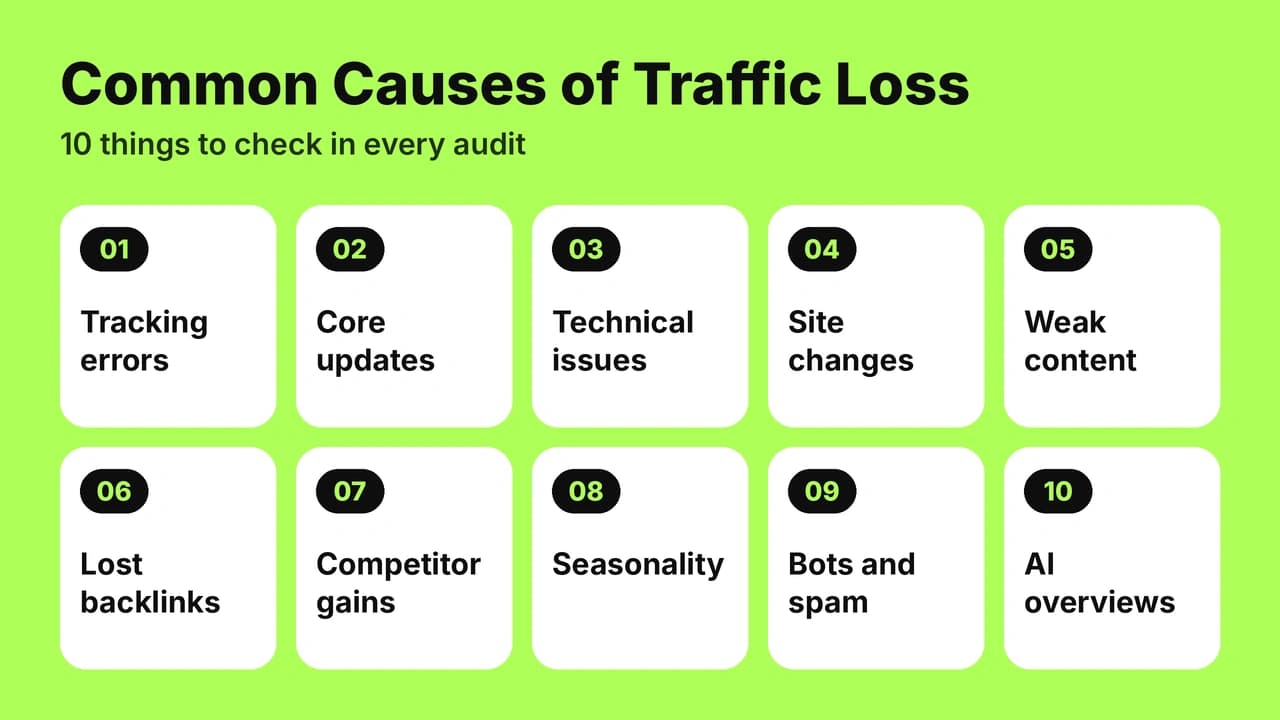
Common causes fall into ten groups. Things go wrong in many ways. An accidental edit can hit rankings fast.
Tracking and Analytics Errors
Analytics errors can fake a drop. A tag may have stopped firing. A new consent banner can block the cookie. Check your tag manager, campaign tags, and privacy settings. Review campaigns one by one. A browser update or policy change can also break tracking.
Google Core Updates and Algorithm Changes
A Google core update is a broad algorithm change. The August 2023 update is one example. Each update shifts ranking factors, so an algorithmic change can move your pages. It is not a penalty. Google does not penalize you for it. Other pages simply rank higher. Updates can feel personal. Reviewing official Google traffic drop guidance clarifies whether a drop correlates with core updates, manual actions, or site-wide technical resets.
Technical SEO Issues
Technical issues can hide pages. Running a dedicated technical SEO audit reveals crawl errors, broken directives, and server response failures. Server outages stop crawlers. Broken rules can block whole folders. Blocked pages cannot rank. Remove bad blocks fast. These problems are easy to miss.
Site Migrations, Redesigns, and Recent Site Changes
Recent site changes cause many drops. A redesign or a new theme can break your structure. A cms update or template change can wipe titles. Code deploys and deployments ship bugs. Check what changed. Note when the new version published. Match launches to the drop.
Content Quality and Relevance Decline
Stale content loses relevance. Quality writing keeps pages helpful. Duplicate pages split signals. Old tutorials, a weak article, or thin blog posts can cause a decline.
Lost or Toxic Backlinks
A link carries trust. Lose one inbound link, and you lose a signal. Following structured backlink management best practices prevents sudden authority drops and toxic link accumulation. A toxic link can hurt authority. Outbound links to bad pages can too. Rankings tied to one source fall when it goes. Strengthen the profile with PR and stronger sources.
Competitor Gains
Competing brands may win your market share. Their mentions grow. Their reputation grows too. The industry gap widens.
Seasonality and Demand Shifts
Seasonality shifts demand. Patterns repeat by weekday, month, and year. A demand shift is not a loss.
Bot and Spam Traffic Changes
Bots and spam inflate counts. Spiders on the IAB list add fake visits. When bot traffic fades, your totals drop.
AI Overviews and SERP Feature Changes
AI overviews answer questions on the SERP. These features, snippets, and ads push links down. Engines show answers, so visibility falls even when rankings hold, making the GEO vs SEO audit distinction essential for tracking both search surfaces.
Step-by-Step Website Traffic Loss Audit Framework
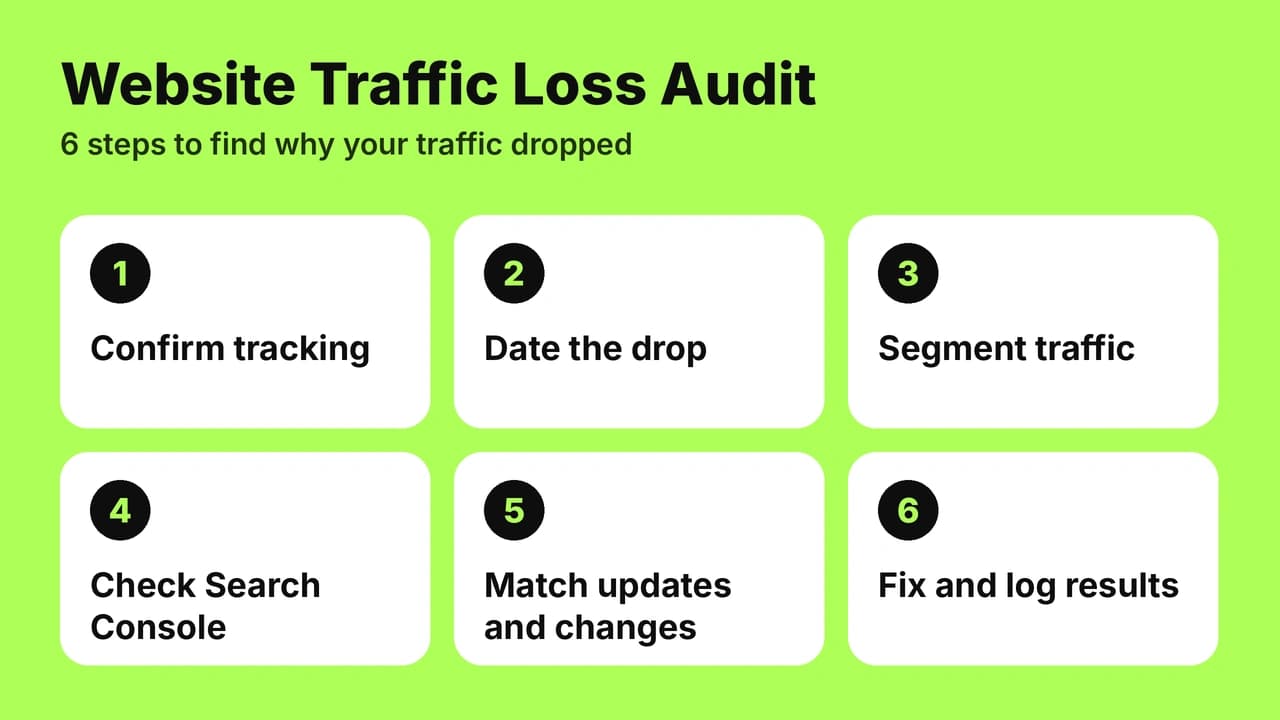
A proper website traffic loss audit follows a simple framework. Each stage builds on the last. Knowing where to start is the hard part. Start with Step 1.
Step 1: Confirm Analytics and Tracking Are Working
Check your setup. Confirm events fire. The audit starts here, since bad data ruins every later step.
Step 2: Define and Date the Drop Precisely
Define the drop. Pin a specific date. Note the point where it began. Set a date range, such as Mar 1 to Mar 31. Compare that period to a baseline. Name one goal metric.
Step 3: Segment Traffic by Channel, Page, Device, and Country
Segment sessions by channel, page, device, and country. Review each channel separately. Which source lost visits? Isolate the audience. Check direct visitors and each visitor type. Note which countries fell. Then test attribution.
Step 4: Check Google Search Console for Organic Drops
Open Search Console. Review organic results. Check index coverage.
Step 5: Analyze Keyword Rankings, Clicks, and Impressions
Compare impressions and clicks. If impressions held but clicks fell, clickthrough dropped. Sort queries as branded or nonbranded. Check average position for each keyword. Spot any ranking loss in positions. Track search volume for key terms. Review each query.
Step 6: Align the Timeline with Algorithm Updates and Site Changes
Build a timeline. Put each event in sequence. Match the drop date to a trigger.
Step 7: Separate Seasonality from Real Loss
Separate seasonal dips from real loss. Overlay last year’s lines on this year’s. Compare the previous week too.
Step 8: Look for Bot and Spam Traffic Changes
Step 8 filters noise. Filtering excludes suspicious referrers and datacenter visits. Check each IP address. Treating every visit as qualified is a mistake. Bots can look like high-converting visitors.
Step 9: Audit the Technical Foundation (Crawling, Indexing, Redirects, Canonicals)
Check crawling and indexing. Review robots rules in robots.txt. Confirm the sitemap lists live URLs. Each url should return status 200. A 404 loses traffic. A redirect should point to the preferred page. Fix canonicals pointing to the wrong page. Look for a stray noindex tag.
Step 10: Evaluate On-Page SEO
Evaluate on-page work. Review titles and layout. Check internal links. Test optimization changes. Did A/B testing alter your pages?
Step 11: Assess Content Quality and Search Intent Alignment
Check intent alignment. Does the page match the searcher’s language? Does it fit the buyer journey?
Step 12: Review the Backlink Profile
Review your backlinks profile. Note lost authoritative links. Use disavow only for clear spam.
Step 13: Diagnose Page Speed, Mobile Usability, and User Experience
Slow pages cost users. Test mobile speed. Check usability and navigation. Watch bounce and engagement. Judge user experience and overall performance.
Step 14: Benchmark Against Competitors
Benchmark each competitor. Research their pages. Compare traffic trends. Keep comparing every quarter.
Data Sources and Tools for a Traffic Loss Audit
Good data sources matter. Set up your resources before you start. Use more than one view.
Google Analytics vs. Google Search Console
GA4 reports show sessions and events. Search Console shows queries. Compare search impressions directly against on-site analytics, and read both side by side.
Server Logs and CDN Data
Server logs record every request. A serverlog shows bot hits. CDN data adds edge traffic. Backend records fill gaps. Pull samples first.
Rank Tracking and Backlink Tools
Track rank with a checker. These tools keep historical data.
Prioritize Fixes by Business Impact

Prioritize fixes by business impact. Use a revenue-first, strategic view. Importance matters more than volume. Some teams prioritise differently, but a prioritised list works best when it is prioritized by revenue. Apply labels based on impact. Set one priority per issue:
- P1 (Critical): Revenue pages are broken, deindexed, or returning error codes.
- P2 (High Priority): Traffic is falling across valuable commercial and organic landing pages.
- P3 (Maintenance): The issue is minor, such as isolated informational dips or cosmetic layout bugs.
Which Pages to Fix First
Fix top pages first. Start with high-value landing pages. Group underperforming pages by type. Check where visitors land. Then review the home page.
Quick Wins vs. Long-Term Fixes
Fix the fastest wins first. Broken redirects give quick victories. Content work moves the needle later. Stop chasing small gains.
Decision Tree for the Next Action
This decision tree narrows your next action. Choose by situation. Follow this order:
- Select tracking first if data looks wrong. Stop and fix it.
- Act on technical faults next if pages are blocked.
- Choose content work if rankings fell after an update.
- Wait if the pattern is seasonal. A clear match tells you when to act.
From Audit to Recovery: Turning Findings into a Plan
Findings need a plan. Turn recommendations into a roadmap. Pick a strategy for each of the three areas, then plan remediation in measurable stages. Add final information to each stage. Follow it step by step. Getting started takes one decision.
Build a Recovery Log
Create a log. Build it early. Records show what you observed and shipped. Each record needs an outcome. Put it in one place.
Minimum Evidence Pack Before Proposing Fixes
Collect a minimum evidence pack before proposing fixes. Add screenshots, dates, and queries. Validate each item. List what you checked and what you found. Each check takes a few min.
How Long Does Traffic Recovery Take?
Time varies. You can recover some losses in days. Others take weeks or months. Not every loss is recoverable. Wait for data before you call it. Each stage ends with a recheck, and the plan ends when traffic returns.
Prevent Repeat Traffic Drops and Measurement Confusion
Prevent repeat drops with annotation. Mark every change. Clean measurement prevents confusion. Ongoing monthly reviews make the next audit easier. Use these tips to keep your data clear.
Ecommerce Traffic Loss Audit Considerations
An ecommerce audit has extra checks. Shopify is one platform to review. Each online store has product pages. Watch price and sale pages. Review categories and collections. Check filters, sections, and templates. Listings can create duplicates. Larger stores need more care. B2B markets add long buying cycles. Stores with many prices should check each variant.
DIY vs. Professional Traffic Loss Audit
Professional services offer a guided approach. Digital marketing teams run an assessment with experienced consultants.
Manual vs. Automated Audits
Manual audits catch context. Automated audits scan fast. Each works for different needs.
Can ChatGPT or AI Tools Run an SEO Audit?
ChatGPT and Gemini can run checks on data you paste. Their capabilities stop at your private accounts.
What a Professional Audit Includes
You’ll receive a written report. It is delivered by email. Receiving a full report means every step is covered. We provide case studies. A person reviews your data personally. Real cases show what to expect.
How Much Does a Traffic Loss Audit Cost?
Pricing depends on scope. Reviewing our SEO audit pricing helps founders choose between one-time triage packages and ongoing retainers. A site with 2000 pages may need additional hours. A one-off 30-minute call is another option.
When to Hire an SEO Expert
Hire expertise when drops persist. I’m available for consulting. Book a consultation call. Contact me for support. Training can help your team work in-house.
Frequently Asked Questions
Why did my website traffic drop?
Start with what’s measurable. A drop means one of several reasons. The audit finds which one.
How do you tell if a traffic drop is a tracking bug or a real loss?
A false drop often follows a consent banner change. We’ve confirmed this by comparing sources. A server log separates bugs from real loss.
Why segment traffic by channel, page, and device instead of looking at one number?
Segments show where the loss sits. A single number hides it. Devices behave differently. Each visitor type does too. People find you in many ways.
What does Google Search Console show that analytics does not?
Search Console shows queries and impressions. Analytics doesn’t show search demand before the click.
Can a site change cause a traffic drop without anyone noticing?
Yes. Small edits can break titles. Run checks after every release. Make a note of each one. It becomes part of your log.
Could a traffic drop actually be bot traffic disappearing?
Yes. A suspected bot spike turns out to be zero-engagement or low-intent visits. Removing them shows the true level.
Can traffic come back after a drop?
Yes. Traffic typically comes back once you fix the cause. Some losses are permanent.
Can you recover from a Google core update?
Yes, often. Don’t expect a quick fix. Improve content quality and wait for the next update.
Do I need an SEO audit after a site migration?
Yes. Run a migration audit within the first weeks to catch broken redirects.
How long does a traffic loss audit take?
A small site takes less time than a large one. Scope sets the pace.
Do I need to share Search Console access?
Yes. Share read-only access, not your account login. It speeds up the work.
Do you guarantee traffic recovery?
No one can guarantee recovery. We aim to leave you satisfied with the findings. A website traffic loss audit gives you facts before fixes.
Need a Technical SEO Audit or Strategy Call?
Connect directly on WhatsApp to review your site speed, topical architecture, and organic growth roadmap.